Search and Select
Intent
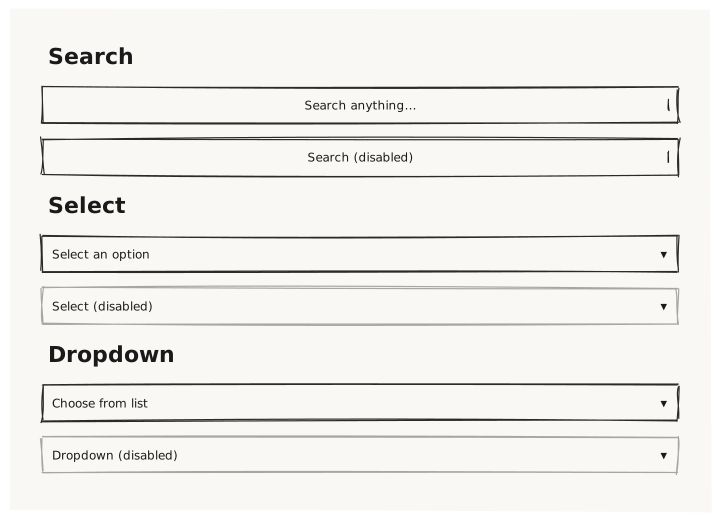
Validate that Search, Select, and Dropdown controls render with their placeholder text, correct intrinsic height (36px), and visual affordance distinguishing each from a plain Input.
What is being tested
- Search: shows a magnifier glyph or indicator inside the control
- Select: shows a dropdown arrow affordance
- Dropdown: similar to Select but semantically a trigger for a menu
- All three: 36px intrinsic height, placeholder text visible
- disabled state: reduced opacity on all three types
Acceptance criteria
✓ No errors ✓ Search renders with a search affordance (distinct from Input) ✓ Select renders with a dropdown arrow on the right ✓ Dropdown renders similarly to Select ✓ All three share the same intrinsic height ✓ Disabled variants have reduced opacity
Example
Screen {
  width: 700
  height: 500
  padding: 32

  Column {
    gap: 16

    Text { text: "Search"    variant: heading }
    Search   { placeholder: "Search anything…"      width: 100% }
    Search   { placeholder: "Search (disabled)"     width: 100%  disabled: true }

    Text { text: "Select"    variant: heading }
    Select   { placeholder: "Select an option"      width: 100% }
    Select   { placeholder: "Select (disabled)"     width: 100%  disabled: true }

    Text { text: "Dropdown"  variant: heading }
    Dropdown { placeholder: "Choose from list"      width: 100% }
    Dropdown { placeholder: "Dropdown (disabled)"   width: 100%  disabled: true }
  }
}
Preview