Modal
Intent
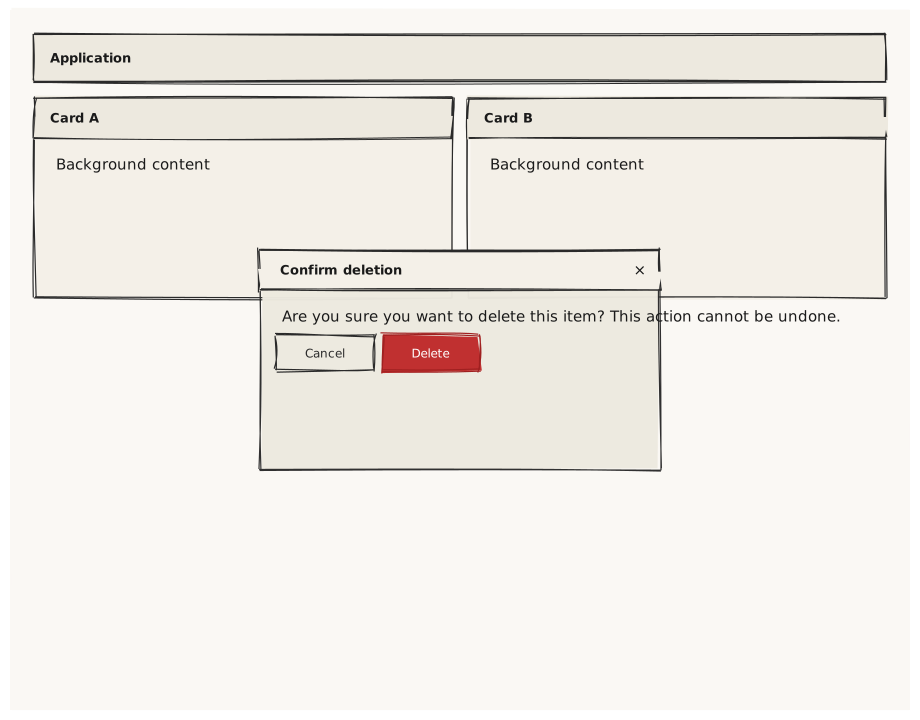
Validate that Modal renders as an overlaid dialog centered on the Screen, with a title header, scrollable content area, and an action footer. The background content is visible but dimmed behind the Modal.
What is being tested
- Modal with title renders a 40px header strip
- Modal positioned at center overlays the background
- Background content (Column of Cards) is visible behind the modal
- Footer row with Cancel + Confirm buttons inside the Modal
- Small modal (confirm dialog) vs large modal (form dialog)
Acceptance criteria
✓ No errors ✓ Background Cards visible in the corners around the Modal ✓ Modal appears centered on the canvas ✓ Modal title strip visible at the top of the modal box ✓ Action buttons visible at the bottom of the modal content ✓ Modal boundary is clearly distinct from the background
Example
Screen {
  width: 900
  height: 700

  // Background content (visible behind the modal)
  Column {
    width: 100%
    height: 100%
    padding: 24
    gap: 16

    Navbar { title: "Application"  width: 100% }

    Row {
      gap: 16
      Card { title: "Card A"  width: 50%  height: 200
        Text { text: "Background content"  variant: body }
      }
      Card { title: "Card B"  width: 50%  height: 200
        Text { text: "Background content"  variant: body }
      }
    }
  }

  // Confirmation modal (small)
  Modal {
    title: "Confirm deletion"
    width: 400
    height: 220
    position: center

    Text { text: "Are you sure you want to delete this item? This action cannot be undone."  variant: body }

    Row {
      gap: 8
      Button { text: "Cancel"  variant: secondary }
      Button { text: "Delete"  variant: danger    }
    }
  }
}
Preview