Button Variants
Intent
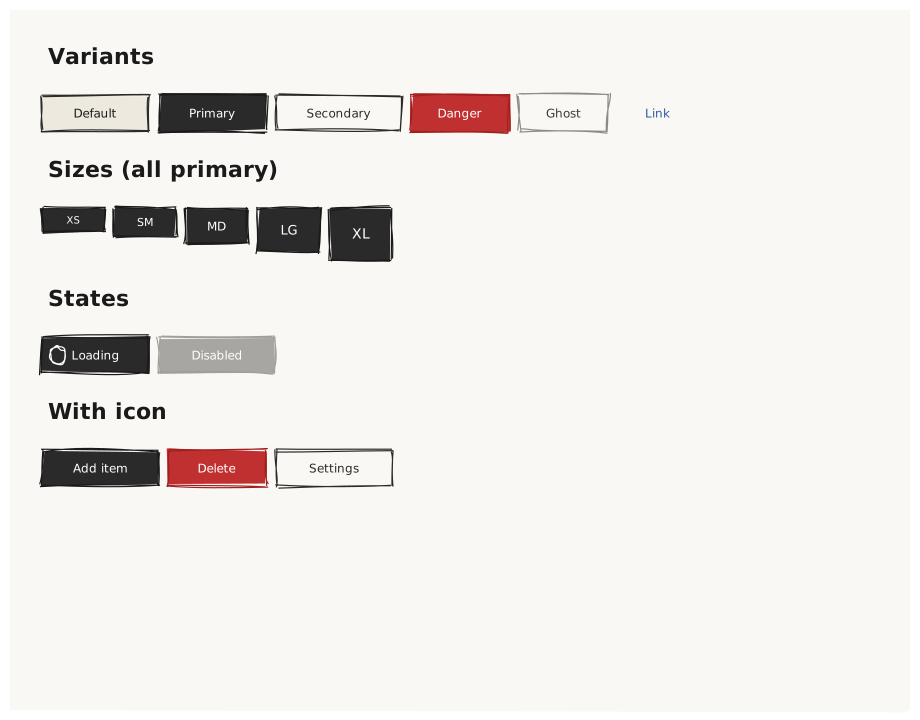
Validate that Button renders correctly across all variant, size, and state combinations. Button is the most-used interactive control — if its pipeline is broken, nearly every UI mockup will look wrong.
What is being tested
Variants: default / primary / secondary / danger / ghost / link Sizes: xs / sm / md / lg / xl (intrinsic height changes per size) States: loading: true / disabled: true Icon: Button with icon: "star" alongside the label
Acceptance criteria
✓ No errors or validator warnings ✓ Row 1: 6 buttons with visually distinct fill/stroke styles ✓ Row 2: 5 buttons with increasing height from xs to xl ✓ "Loading" button shows a visual indicator (spinner icon placeholder) ✓ "Disabled" button has noticeably reduced opacity ✓ Icon button shows a glyph to the left of its label ✓ All button labels centered within their bounding box
Example
Screen {
  width: 900
  height: 700
  padding: 32

  Column {
    gap: 24

    Text { text: "Variants"  variant: heading }
    Row {
      gap: 10
      Button { text: "Default"    variant: default   }
      Button { text: "Primary"    variant: primary   }
      Button { text: "Secondary"  variant: secondary }
      Button { text: "Danger"     variant: danger    }
      Button { text: "Ghost"      variant: ghost     }
      Button { text: "Link"       variant: link      }
    }

    Text { text: "Sizes (all primary)"  variant: heading }
    Row {
      gap: 10
      Button { text: "XS"  size: xs  variant: primary }
      Button { text: "SM"  size: sm  variant: primary }
      Button { text: "MD"  size: md  variant: primary }
      Button { text: "LG"  size: lg  variant: primary }
      Button { text: "XL"  size: xl  variant: primary }
    }

    Text { text: "States"  variant: heading }
    Row {
      gap: 10
      Button { text: "Loading"   variant: primary  loading: true  }
      Button { text: "Disabled"  variant: primary  disabled: true }
    }

    Text { text: "With icon"  variant: heading }
    Row {
      gap: 10
      Button { text: "Add item"    variant: primary    icon: "plus"   }
      Button { text: "Delete"      variant: danger     icon: "delete" }
      Button { text: "Settings"    variant: secondary  icon: "settings" }
    }
  }
}
Preview