Checkbox and Radio
Intent
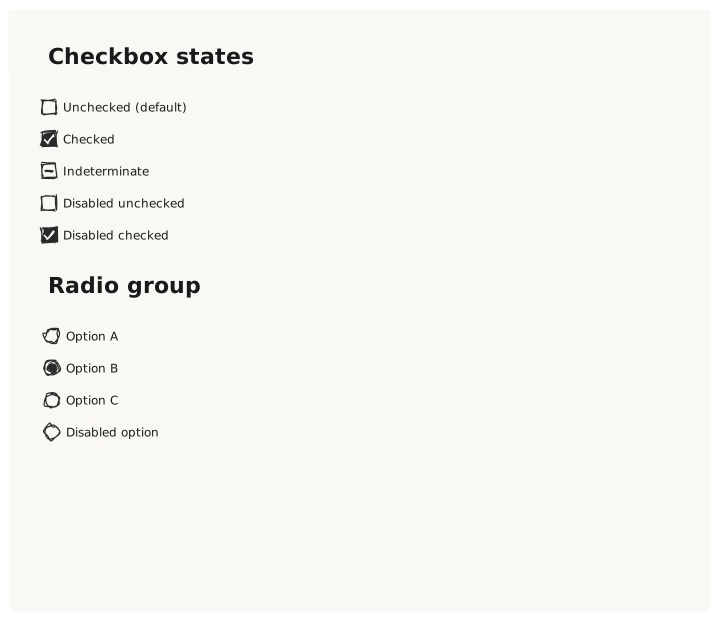
Validate that Checkbox and Radio controls render their text label alongside the control glyph, and that checked/unchecked/indeterminate states produce visually distinct appearances.
What is being tested
Checkbox states: unchecked / checked: true / indeterminate: true / disabled Radio states: unchecked / checked: true / disabled Grouping: multiple Radios with the same name simulate a radio group
Acceptance criteria
✓ No errors ✓ Unchecked controls show an empty box/circle ✓ Checked controls show a filled box/circle with a checkmark indicator ✓ Indeterminate checkbox shows a dash/minus indicator ✓ Disabled controls have reduced opacity ✓ Radio buttons are circles; checkboxes are squares
Example
Screen {
  width: 700
  height: 600
  padding: 32

  Column {
    gap: 24

    Text { text: "Checkbox states"  variant: heading }
    Column {
      gap: 8
      Checkbox { text: "Unchecked (default)"   }
      Checkbox { text: "Checked"                checked: true         }
      Checkbox { text: "Indeterminate"           indeterminate: true   }
      Checkbox { text: "Disabled unchecked"      disabled: true        }
      Checkbox { text: "Disabled checked"        checked: true  disabled: true }
    }

    Text { text: "Radio group"  variant: heading }
    Column {
      gap: 8
      Radio { text: "Option A"          name: "group1"  }
      Radio { text: "Option B"          name: "group1"  checked: true  }
      Radio { text: "Option C"          name: "group1"  }
      Radio { text: "Disabled option"   name: "group1"  disabled: true }
    }
  }
}
Preview