Toast Variants
Intent
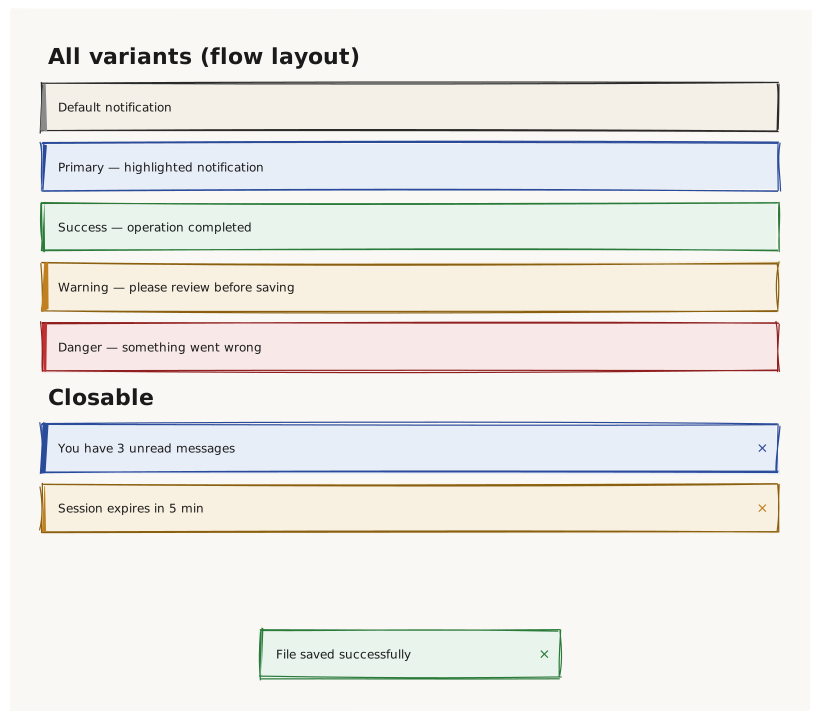
Validate that Toast renders identically to Alert in terms of structure and variants, but is typically used overlaid on the screen (positioned). All 5 variants and the closable state are tested.
What is being tested
- Same 5 variants as Alert (default, primary, success, warning, danger)
- closable: true adds a dismiss button
- Toast positioned at bottom-center to simulate real usage
Acceptance criteria
✓ No errors ✓ Five distinct Toast colors matching their Alert equivalents ✓ Closable Toasts show a dismiss button ✓ Bottom-positioned Toast appears at the bottom of the canvas
Example
Screen {
  width: 800
  height: 700
  padding: 32

  Column {
    gap: 12

    Text { text: "All variants (flow layout)"  variant: heading }
    Toast { text: "Default notification"                     variant: default   width: 100% }
    Toast { text: "Primary — highlighted notification"       variant: primary   width: 100% }
    Toast { text: "Success — operation completed"            variant: success   width: 100% }
    Toast { text: "Warning — please review before saving"    variant: warning   width: 100% }
    Toast { text: "Danger — something went wrong"            variant: danger    width: 100% }

    Text { text: "Closable"  variant: heading }
    Toast { text: "You have 3 unread messages"  variant: primary  width: 100%  closable: true }
    Toast { text: "Session expires in 5 min"    variant: warning  width: 100%  closable: true }
  }

  // Overlaid toast at the bottom center (real usage pattern)
  Toast {
    text: "File saved successfully"
    variant: success
    width: 300
    position: bottomcenter
    closable: true
  }
}
Preview