Image
Intent
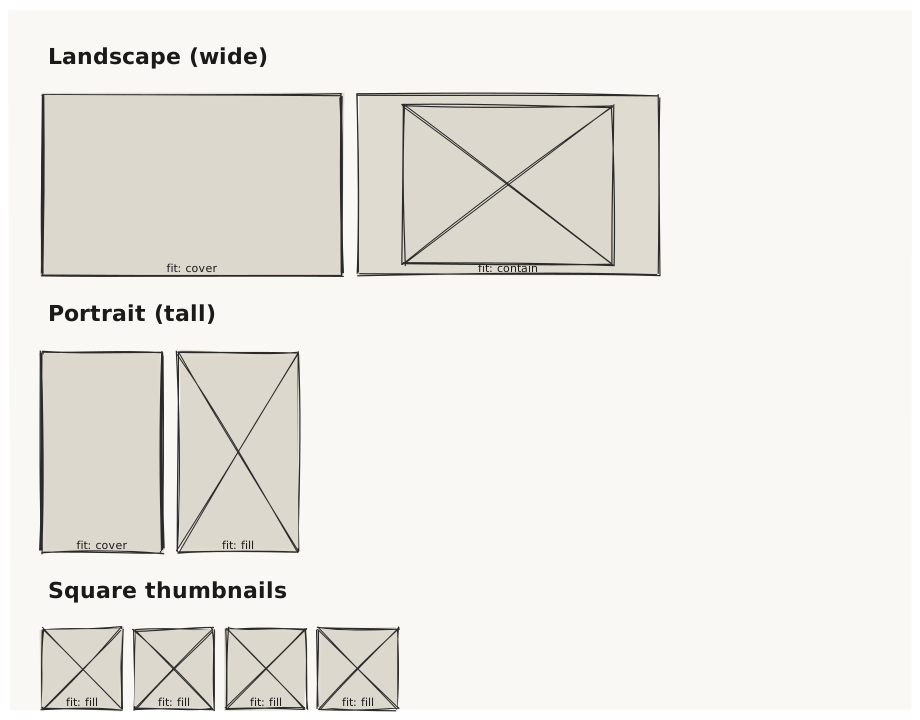
Validate that Image renders a hatched placeholder rectangle at the specified dimensions, and that the fit prop affects how the placeholder is drawn (aspect-ratio awareness).
What is being tested
- Image with explicit width and height
- fit: fill / contain / cover / none / scale-down
- alt text is noted in metadata (not rendered visibly)
- Image with only width set (no height) falls back to a default
Acceptance criteria
✓ No errors ✓ Each Image renders as a hatched rectangle at its declared size ✓ Tall vs. wide images produce rectangles with the correct aspect ratio ✓ All five fit variants render without error ✓ Cursor on any Image line highlights its bounding box
Example
Screen {
  width: 900
  height: 700
  padding: 32

  Column {
    gap: 24

    Text { text: "Landscape (wide)"  variant: heading }
    Row {
      gap: 16
      Image { width: 300  height: 180  alt: "Landscape photo"  fit: cover   }
      Image { width: 300  height: 180  alt: "Landscape photo"  fit: contain }
    }

    Text { text: "Portrait (tall)"  variant: heading }
    Row {
      gap: 16
      Image { width: 120  height: 200  alt: "Portrait photo"  fit: cover   }
      Image { width: 120  height: 200  alt: "Portrait photo"  fit: fill    }
    }

    Text { text: "Square thumbnails"  variant: heading }
    Row {
      gap: 12
      Image { width: 80  height: 80  alt: "Thumbnail" }
      Image { width: 80  height: 80  alt: "Thumbnail" }
      Image { width: 80  height: 80  alt: "Thumbnail" }
      Image { width: 80  height: 80  alt: "Thumbnail" }
    }
  }
}
Preview