Alert Variants
Intent
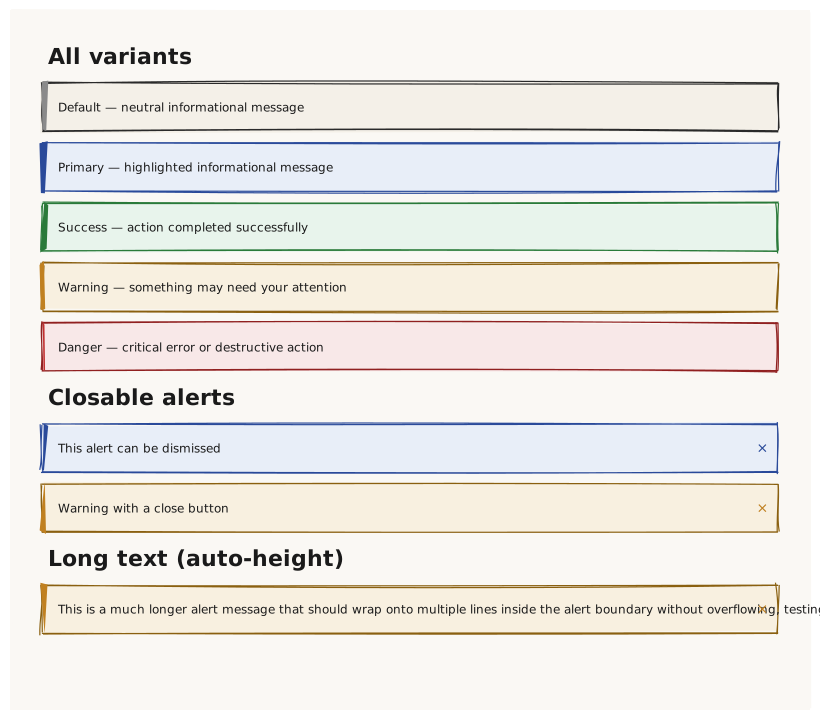
Validate that Alert renders with the correct color per variant, that the closable prop adds a dismiss button, and that long text wraps inside the alert width without overflow.
What is being tested
Variants: default / primary / success / warning / danger closable: true → close (×) button appears on the right edge Long text → wraps within the Alert boundary (auto-height)
Acceptance criteria
✓ No errors ✓ Five visually distinct alert colors ✓ Closable alerts show a × button at the right edge ✓ Long text alert is taller than the short-text alerts ✓ No text overflows the alert boundary
Example
Screen {
  width: 800
  height: 700
  padding: 32

  Column {
    gap: 12

    Text { text: "All variants"  variant: heading }
    Alert { text: "Default — neutral informational message"      variant: default   width: 100% }
    Alert { text: "Primary — highlighted informational message"  variant: primary   width: 100% }
    Alert { text: "Success — action completed successfully"      variant: success   width: 100% }
    Alert { text: "Warning — something may need your attention"  variant: warning   width: 100% }
    Alert { text: "Danger — critical error or destructive action" variant: danger   width: 100% }

    Text { text: "Closable alerts"  variant: heading }
    Alert { text: "This alert can be dismissed"            variant: primary   width: 100%  closable: true }
    Alert { text: "Warning with a close button"            variant: warning   width: 100%  closable: true }

    Text { text: "Long text (auto-height)"  variant: heading }
    Alert {
      text: "This is a much longer alert message that should wrap onto multiple lines inside the alert boundary without overflowing, testing the auto-height behavior of the Alert control when content exceeds one line."
      variant: warning
      width: 100%
      closable: true
    }
  }
}
Preview