Text Truncate
Intent
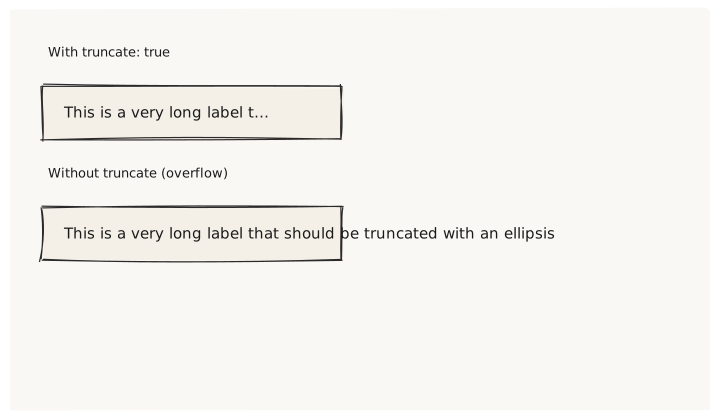
Validate that truncate: true clips a long text string to its container width and appends an ellipsis indicator, while the layout height remains a single line (no wrapping occurs).
What is being tested
- truncate: true keeps the text on one line, clipped at container width
- Without truncate, the same text overflows its container
- The intrinsic height of a truncated Text is the same as a short Text
Acceptance criteria
✓ No errors ✓ "With truncate" row: text ends with "…" or is visibly cut ✓ "Without truncate" row: same text runs past the Card boundary ✓ Both rows are single-line height (no multi-line wrapping)
Example
Screen {
  width: 700
  height: 400
  padding: 32

  Column {
    gap: 24

    Text { text: "With truncate: true"  variant: caption }
    Card {
      width: 300
      Text {
        text: "This is a very long label that should be truncated with an ellipsis"
        truncate: true
        variant: body
      }
    }

    Text { text: "Without truncate (overflow)"  variant: caption }
    Card {
      width: 300
      Text {
        text: "This is a very long label that should be truncated with an ellipsis"
        variant: body
      }
    }
  }
}
Preview