Card Variants
Intent
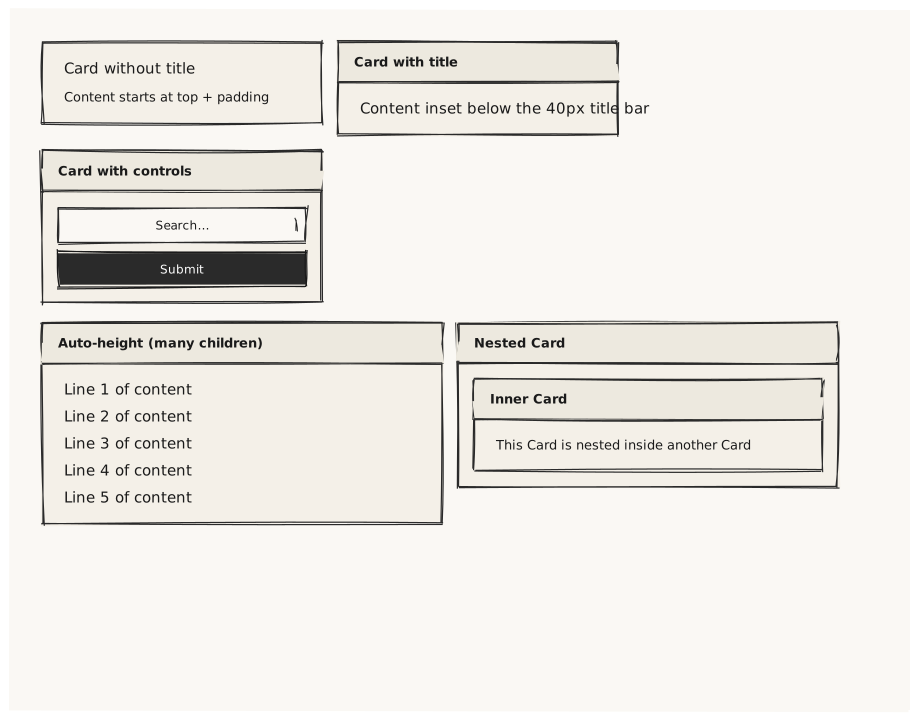
Validate the three main Card configurations: no title, with title (adds a 40px title bar), and with title plus nested controls. This is the most common container in production wireframes.
What is being tested
- Card without title: content starts at top edge + padding
- Card with title: a 40px title strip is rendered above the content area
- Card with title + nested controls: content area shrinks by 40px
- Nested Cards: a Card inside a Card (depth > 1)
- Card with explicit height vs auto-height (grows to content)
Acceptance criteria
✓ No errors ✓ No-title Card: content at the top, no header strip ✓ Title Card: bold title visible in a header strip at the top ✓ Title Card content area is inset below the title strip ✓ Auto-height Card expands to fit all children ✓ Nested Card is inset within the parent Card's padding
Example
Screen {
  width: 900
  height: 700
  padding: 32

  Column {
    gap: 20

    Row {
      gap: 16

      Card {
        width: 280
        Text { text: "Card without title"  variant: body }
        Text { text: "Content starts at top + padding"  variant: caption }
      }

      Card {
        title: "Card with title"
        width: 280
        Text { text: "Content inset below the 40px title bar"  variant: body }
      }

      Card {
        title: "Card with controls"
        width: 280
        Column {
          gap: 8
          Input  { placeholder: "Search…"  width: 100% }
          Button { text: "Submit"  variant: primary  width: 100% }
        }
      }
    }

    Row {
      gap: 16

      Card {
        title: "Auto-height (many children)"
        width: 400
        Column {
          gap: 6
          Text { text: "Line 1 of content"  variant: body }
          Text { text: "Line 2 of content"  variant: body }
          Text { text: "Line 3 of content"  variant: body }
          Text { text: "Line 4 of content"  variant: body }
          Text { text: "Line 5 of content"  variant: body }
        }
      }

      Card {
        title: "Nested Card"
        width: 380

        Card {
          title: "Inner Card"
          width: 100%
          Text { text: "This Card is nested inside another Card"  variant: caption }
        }
      }
    }
  }
}
Preview