Pagination
Intent
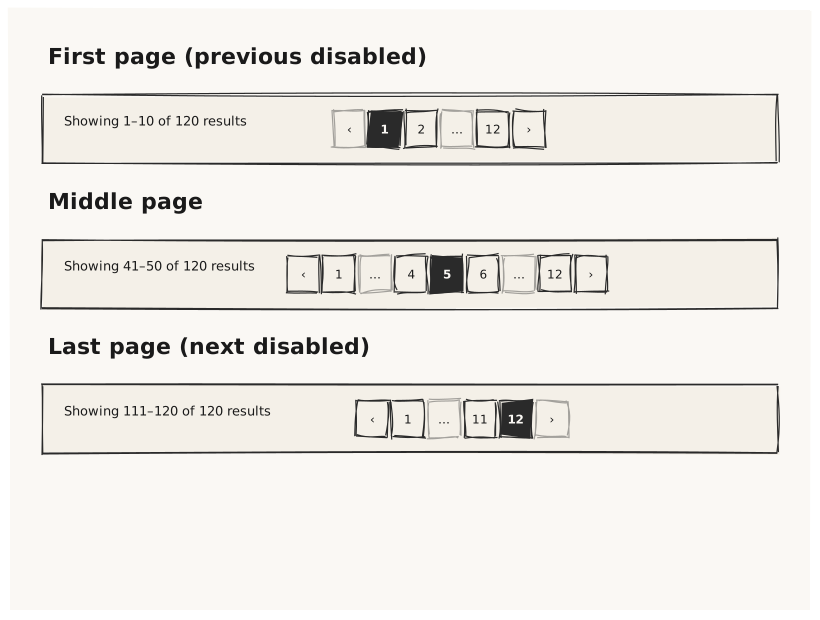
Validate that Pagination renders a page-navigation control with previous/ next buttons and a current-page indicator, and that different page/total combinations produce the correct number of visible page buttons.
What is being tested
- page: 1 (first page) → previous button disabled
- page: N (last page) → next button disabled
- page: middle → both buttons active
- total + pageSize determine the number of pages
- Pagination inside a Card footer (common usage pattern)
Acceptance criteria
✓ No errors ✓ Pagination renders visibly with prev/next buttons and page number ✓ First-page variant has a visually inactive "previous" button ✓ Last-page variant has a visually inactive "next" button ✓ Middle-page variant has both buttons active ✓ Pagination fits inside the Card footer without overflow
Example
Screen {
  width: 800
  height: 600
  padding: 32

  Column {
    gap: 24

    Text { text: "First page (previous disabled)"  variant: heading }
    Card {
      width: 100%
      Row {
        gap: 8
        Text      { text: "Showing 1–10 of 120 results"  variant: caption }
        Pagination { page: 1   total: 120  pageSize: 10  width: 300 }
      }
    }

    Text { text: "Middle page"  variant: heading }
    Card {
      width: 100%
      Row {
        gap: 8
        Text      { text: "Showing 41–50 of 120 results"  variant: caption }
        Pagination { page: 5   total: 120  pageSize: 10   width: 300 }
      }
    }

    Text { text: "Last page (next disabled)"  variant: heading }
    Card {
      width: 100%
      Row {
        gap: 8
        Text      { text: "Showing 111–120 of 120 results"  variant: caption }
        Pagination { page: 12  total: 120  pageSize: 10     width: 300 }
      }
    }
  }
}
Preview