Gap and Padding
Intent
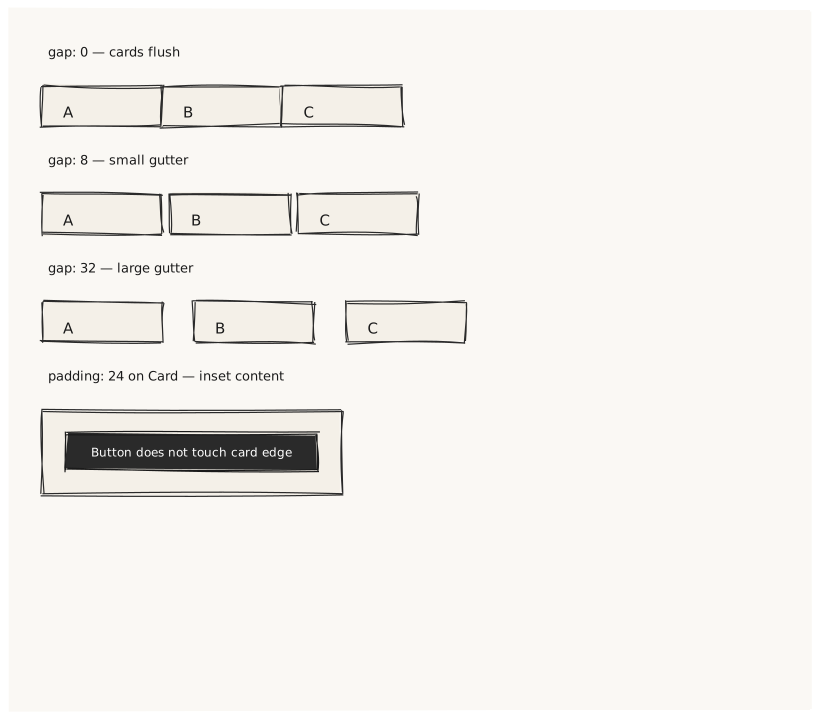
Validate that gap and padding produce correct visual spacing at every nesting level. Four cards demonstrate no-gap, small gap, large gap, and the combined effect of padding inside a container.
What is being tested
- gap: 0 → children touch each other with no space
- gap: 8 → 8px space between children
- gap: 32 → 32px space between children
- padding: 24 on a Card insets all four edges by 24px
- Children do not bleed outside the padded area
Acceptance criteria
✓ No errors ✓ "gap: 0" row: cards flush against each other, no visible gap ✓ "gap: 8" row: small consistent gutter between cards ✓ "gap: 32" row: large visible gutter — wider than card height ✓ Padded Card: inner button does not touch the Card's edge
Example
Screen {
  width: 800
  height: 700
  padding: 32

  Column {
    gap: 24

    Text { text: "gap: 0 — cards flush"   variant: caption }
    Row {
      gap: 0
      Card { width: 120  height: 40  Text { text: "A"  align: center } }
      Card { width: 120  height: 40  Text { text: "B"  align: center } }
      Card { width: 120  height: 40  Text { text: "C"  align: center } }
    }

    Text { text: "gap: 8 — small gutter"  variant: caption }
    Row {
      gap: 8
      Card { width: 120  height: 40  Text { text: "A"  align: center } }
      Card { width: 120  height: 40  Text { text: "B"  align: center } }
      Card { width: 120  height: 40  Text { text: "C"  align: center } }
    }

    Text { text: "gap: 32 — large gutter"  variant: caption }
    Row {
      gap: 32
      Card { width: 120  height: 40  Text { text: "A"  align: center } }
      Card { width: 120  height: 40  Text { text: "B"  align: center } }
      Card { width: 120  height: 40  Text { text: "C"  align: center } }
    }

    Text { text: "padding: 24 on Card — inset content"  variant: caption }
    Card {
      width: 300
      padding: 24
      Button { text: "Button does not touch card edge"  variant: primary  width: 100% }
    }
  }
}
Preview